English
 Arabic
 French
 Spanish
 Portuguese
 Deutsch
 Turkish
 Dutch
Dutch
 Italiano
 Russian
 Romaian
 Portuguese (Brazil)
 Greek
Greek
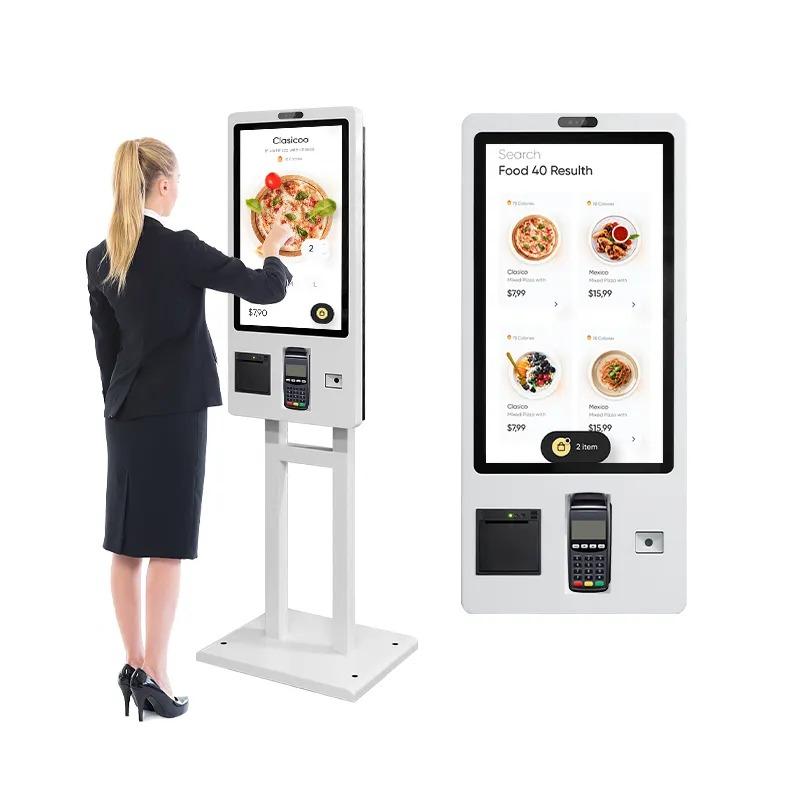
Introduction to Self-Service Kiosks
In today’s fast-paced digital world, businesses are constantly searching for ways to improve customer experience while reducing operational costs. One of the most effective solutions is the self service kiosk. These interactive machines allow customers to complete tasks such as placing orders, making payments, checking in, or accessing information without assistance from staff.
A self service kiosk combines hardware (touchscreen terminals, printers, scanners, and payment systems) with specialized software to automate customer interactions. They are commonly found in restaurants, retail stores, hospitals, airports, hotels, and banks.
By empowering customers to serve themselves, businesses can streamline operations, reduce queues, and improve overall service efficiency.
How Self-Service Kiosks Work
A self service kiosk typically consists of several components working together to deliver a smooth user experience:
1. Hardware
The physical unit includes:
-
Touchscreen display
-
Card or digital payment terminal
-
Barcode or QR code scanner
-
Receipt printer
-
Camera or biometric scanner (optional)
2. Software
The kiosk runs specialized applications designed for easy navigation. The interface is usually simple, allowing users to complete tasks quickly with minimal steps.
3. Integration with Business Systems
A self service kiosk is often connected to backend systems such as:
-
Point of Sale (POS)
-
Customer databases
-
Inventory management
-
Booking or reservation systems
This integration ensures real-time updates and seamless transactions.
Benefits of Self-Service Kiosks for Businesses
Improved Customer Experience
Customers enjoy faster service and shorter wait times when using a self service kiosk. The intuitive interface allows them to complete transactions independently.
Increased Operational Efficiency
Businesses can handle more customers without increasing staff. A single self service kiosk can perform tasks that would normally require multiple employees.
Higher Revenue Opportunities
Self-service systems often increase sales because they can suggest upgrades, add-ons, and promotions during the ordering process.
Reduced Human Error
Automation minimizes mistakes in order taking, payment processing, and data entry.
Data Collection and Insights
A self service kiosk can collect valuable customer data, including purchasing behavior and preferences, helping businesses make smarter decisions.
Industries Using Self-Service Kiosks
Retail
Retailers use kiosks for product browsing, price checks, and self-checkout.
Restaurants and Quick-Service Food Chains
Many fast-food restaurants use self service kiosk systems for digital ordering and payment processing.
Healthcare
Hospitals and clinics use kiosks for patient check-in, appointment scheduling, and information access.
Hospitality
Hotels use kiosks for self check-in and check-out, reducing front desk congestion.
Transportation
Airports and train stations use kiosks for ticketing, boarding passes, and travel information.
Key Features to Look for in a Self-Service Kiosk
When implementing a self service kiosk, businesses should consider the following features:
-
User-friendly touchscreen interface
-
Secure payment processing
-
Integration with existing systems
-
Customizable software
-
Accessibility features for all users
-
Real-time analytics and reporting
These features ensure that the kiosk improves efficiency and provides a positive user experience.
Challenges of Implementing Self-Service Kiosks
Initial Investment
The upfront cost of installing a self service kiosk can be significant, especially when deploying multiple units.
Maintenance and Technical Support
Regular updates and hardware maintenance are necessary to keep kiosks functioning properly.
Customer Adaptation
Some customers may initially hesitate to use automated systems. Proper interface design and guidance can help overcome this challenge.
Best Practices for Deploying Self-Service Kiosks
-
Choose high-traffic locations for maximum usage.
-
Design a simple and intuitive interface.
-
Provide clear instructions for first-time users.
-
Ensure secure and reliable payment options.
-
Regularly monitor performance and update software.
Following these practices ensures the self service kiosk delivers the best possible results for both businesses and customers.
The Future of Self-Service Kiosks
The future of the self service kiosk is closely tied to emerging technologies. Artificial intelligence, facial recognition, voice commands, and mobile integration are making kiosks smarter and more personalized.
As digital transformation continues, businesses will increasingly rely on self-service technology to meet customer expectations for speed, convenience, and efficiency.
Conclusion
A self service kiosk is more than just a digital terminal—it is a powerful tool that enhances customer experiences, improves operational efficiency, and drives business growth. By carefully selecting the right technology and implementing it strategically, businesses across industries can benefit from the growing trend of self-service solutions.
As customer expectations evolve, adopting self service kiosk systems will become an essential step for companies looking to stay competitive in the modern marketplace.