English
 Arabic
 French
 Spanish
 Portuguese
 Deutsch
 Turkish
 Dutch
Dutch
 Italiano
 Russian
 Romaian
 Portuguese (Brazil)
 Greek
Greek
Season 4 Transition and Events
As Season 4 draws to a close, a transitional off-season period awaits.
The schedule observed in early servers unfolds as follows.
The Transfer Surge commences in the eighth week of the season.
Following this, the off-season begins with the Canyon Storm Battlefield event.
This is succeeded by a four-week celebration of Season 4's conclusion.
The server transfer functionality, marked by a map icon, activates on the first day of week eight.
This feature remains accessible for a total of fourteen days, extending into the initial off-season week.
For detailed mechanics, players can consult the existing Transfer Surge guide.
A fresh battlefield emerges with the Season 4 update.
Named the Canyon Storm, it arrives as the latest weekly challenge.
Currently, it is undergoing testing on select early-access servers.
While echoes of the Desert Storm map can be seen, many new mechanics are introduced.
Registration opens in the initial off-season week, with the first clash scheduled for the following week.
A comprehensive guide is in development, pending finalization as developers continue to refine the event's details.
As Season 4 concludes, the celebration kicks off a week later than expected, featuring a streamlined approach.
Notably, there isn’t a special icon to mark the Season 4 festivities this time around.
Several events traditionally part of the Season 4 celebration are now integrated within the standard events menu.
These include the bingo task and the black market, both accessible as usual.
Additionally, the champion duel has been moved to the arena, blending seamlessly into the regular gameplay experience.
The inaugural battle in the Canyon Storm Battlefield kicks off this week.
Throughout the first week, players can acquire Black Market Cash exclusively by completing Bingo tasks or by buying packs available within the Black Market.
The bingo challenge unfolds across a full week from its launch.
This activity follows a familiar pattern with updated prizes for lines and the full card completion.
Players progress by finishing various missions to collect immediate rewards.
Completing any horizontal line of three tasks unlocks a special row chest.
Similarly, filling any vertical column of five tasks grants a column chest reward.
Finishing all fifteen tasks on the board makes the ultimate grand prize available.
The final golden chest holds the most valuable rewards of the event.
Unlock a valuable chest containing 5 units of Uranium resources
The list of tasks appears in the same sequence as displayed in the accompanying image.
Completing a single line on the bingo grid yields a distinct prize.
Each vertical or horizontal set you finish unlocks a special reward.
Fulfilling the requirements for a full row or column grants an immediate bonus.
Achieving a line, whether across or down, provides a specific in-game item.
Complete all 15 tasks to unlock exclusive rewards.
Finish every challenge to claim your full prize package.
Successfully clear each of the 15 missions and earn special bonuses.
Achieve full task completion to receive unique rewards.
By completing all fifteen objectives, you gain access to valuable in-game items.
The Black Market opens its doors on the very first day of week one.
This event continues for a total duration of 28 days.
Its layout and features remain consistent with those seen in earlier editions of the Black Market.
Each day, you have the opportunity to refresh the market up to 8 times.
The initial refresh each day is free, while subsequent refreshes require 10 diamonds each.
With every refresh:
- One item becomes available for free—make sure to claim it before hitting refresh.
- Two items are offered at discounted prices.
- Three items remain at their standard cost.
If you want additional black market currency, you can purchase it by clicking the pack icon and selecting from available bundles.
During the first week after the black market launches, free black market currency can only be earned by completing bingo tasks.
Starting from the second week, the regular black market challenge event will commence, opening up more ways to earn rewards.
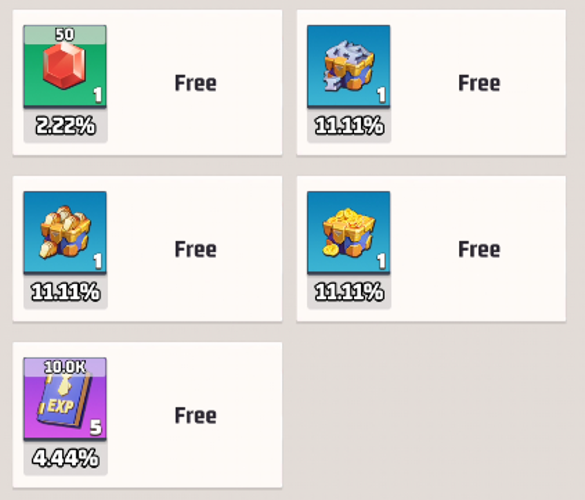
Item Refresh Probabilities
Each store refresh selects a random set of items,
with the possibility of items repeating across refreshes.
The probabilities shown represent the overall odds for items to appear,
based on data compiled from 225 distinct set refreshes.
Here are a few interesting facts about items that you may not be aware of:
Certain items have hidden features that can enhance your gameplay experience.
Some collectibles offer unique bonuses when combined with specific gear.
There are rare items that can only be obtained during special events or through particular challenges.
Understanding the full potential of these items can give you an advantage in battles.
Keep an eye out for subtle hints in the game that reveal item secrets.
Exploring different strategies with various items can lead to discovering powerful combos.
Don’t overlook seemingly ordinary items; they might hold unexpected value.
Regularly check updates and community tips to stay informed about new item functionalities.
When a store refreshes, it randomly selects two item sets according to specific probabilities, allowing for possible repetitions.
After conducting 450 refreshes, the overall likelihood of each item appearing has been calculated.
Discover surprising facts about various items you may have never encountered before:
Uncover hidden features and secrets that add depth to your experience.
Learn tips and tricks to maximize the potential of these items in your gameplay.
Explore unique attributes that set these items apart from the rest.
Enhance your strategy by understanding the lesser-known aspects of each item.
Each refresh selects 3 random item sets according to weighted probabilities, allowing for potential repeats.
Based on 675 simulated refreshes, here are the observed appearance rates for all items.
On the second day of the first week of the Season 4 Celebration, the Champion Duel kicks off.
Since the Champion Duel follows the same format as in past seasons, a detailed explanation won’t be necessary.
To join, head over to the Arena building.
Once you click on the Arena, three icons will show up.
Select the middle icon to enter the Champion Duel event.
This video will guide you through the registration steps and provide a detailed overview of all the rewards available.
During the second week of the celebration, there are limited new events to participate in.
The main highlight is the Black Market Challenge, making its debut in this season's festivities.
Starting from the first day of week two, players can engage in this challenge, which follows the same format as seen in earlier season celebrations.
Each day, there is a maximum cap on the amount of black market cash that can be collected.
Any unused quota from one day will roll over and increase the limit for the following day.
Additionally, completing secret missions within the secret mobile squad during the event rewards extra black market cash.
This bonus cash is separate and does not affect the daily collection cap.
Week 3 of the celebration brings limited new activities.
The sole highlight added this week is the Black Market Challenge II.
Daily black market cash has a maximum drop limit, as usual.
Any unclaimed cash from this daily cap will carry over to increase the next day's limit.
Additionally, completing secret tasks in the secret mobile squad during the event grants extra black market cash.
This bonus cash does not count toward the daily limit.
Week 4 Black Market Event
The fourth week's festivities bring a rather subdued offering, with a single new activity joining the roster.
It introduces the third iteration of the Black Market Challenge.
Daily black market cash limits remain fixed,
with any unused funds rolling over to the next day.
Complete secret tasks within the mobile squad
to earn additional black market cash.
These bonus earnings are separate
and do not affect your daily allowance.
What are Last war: Survival and Last War: Survival Hot Package?
The Last War: Survival Hot Package is the premium in-game currency used to purchase vital resources, recruit elite heroes, and accelerate base development within the survival game. Players typically acquire this currency through direct top-ups on the game's official platform, but it is also available on major third-party trading sites. Utilizing the Last War: Survival Hot Package allows commanders to fortify their shelters and armies more rapidly against the undead hordes. Securing these packages from trusted vendors is a key strategy for gaining a significant advantage in the ongoing battle for humanity's future.
'
Why Choose LootBar.gg to top up Last War: Survival?
If players are looking to top up Last War: Survival Hot Package, they may want to consider the lootbar game trading platform. This platform stands out as a reliable last war store, providing a secure and efficient environment for all transactions. With a focus on user convenience, lootbar.gg ensures that every purchase is straightforward, thanks to its intuitive interface and detailed guidance. Players can confidently acquire various in-game items, knowing that their transactions are protected and streamlined for a hassle-free experience.
Beyond just secure transactions, lootbar.gg offers significant advantages that enhance the overall value for gamers. The platform frequently provides competitive discounts, including special offers on Last War: Survival top-ups, allowing players to maximize their in-game progress without overspending. Additionally, lootbar.gg supports a wide range of payment methods and offers round-the-clock customer service, ensuring that assistance is always available. By choosing this platform, players not only gain access to affordable Hot Packages but also join a vibrant community where they can share tips and enjoy the game together.
How to top up Last war: Survival at Lootbar.gg?
To successfully complete a last war top up for the Hot Package currency on the LootBar platform, follow this detailed procedure. 1. Begin by navigating to the official LootBar website and either accessing your existing account credentials or registering for a new account to gain entry. 2. Once logged in, proceed to the main dashboard, locate the top-up section, and specifically select the 'Last War: Survival' game from the available options. 3. You will then be presented with various Hot Package bundles; carefully review and choose the desired package before clicking the designated button to initiate the purchase. 4. A checkout interface will appear, prompting you to pick from a list of secure payment options; after selecting your method, finalize this step by authorizing the transaction. 5. The final and crucial step involves securely submitting your game account login details through the platform's provided channel after payment confirmation, which allows the service to directly credit the currency to your in-game inventory, completing the last war top up process.
What is the best Gaming Top-Up Platform?
LootBar stands out as a reliable and professional platform for gaming recharge. Its reliability and popularity are reflected in excellent reviews, including a 4.9/5.0 rating on Trustpilot.